Deutsch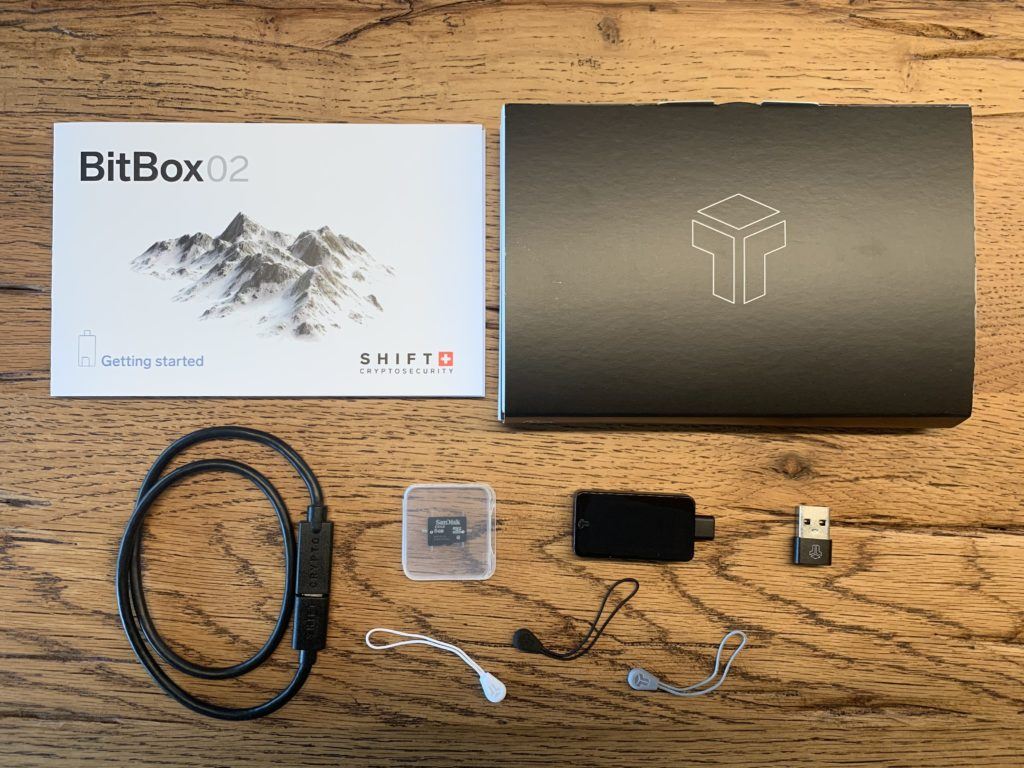
For storing crypto assets, hardware wallets are considered very secure by experts. Particularly well-known are the models from French manufacturer Ledger and its Czech competitor Trezor. But there’s another player in the market: Swiss company Shift Cryptosecurity AG with its BitBox.
A hardware wallet “Made in Switzerland.” We’ve taken a close look at the new BitBox02 hardware wallet and explain how it works.
According to estimates, numerous bitcoins disappear permanently because access to the wallet where they’re stored is no longer possible.
This doesn’t just happen during major disasters like fires or water damage. The paper recovery sheets on which the seed is typically written down sometimes also fall victim to overzealous spring cleaning or simple chaos.
The BitBox02 promises a solution by automatically backing up the wallet on a microSD memory card.
If needed, the recovery seed can also be displayed and written down on paper as is common with other hardware wallets.
BitBox02: The Essentials
- Hardware wallet from Switzerland
- Backup function via microSD card
- Compatible with Windows, macOS, and Linux
- BitBox02 available as Bitcoin only or Multi Edition
- Supports Bitcoin, Litecoin, Ethereum, and ERC20 tokens
BitBox02 Hardware Wallet: First Impression
Right from unpacking, the BitBox02 makes a good impression. The understated, straightforward design and clean workmanship feel high-quality.
At first glance, it could be a normal USB stick with an SD slot. Only on second look does it become clear that the small device must be capable of something more.
But despite its cutting-edge OLED display and invisible touch sensors, laypeople won’t recognize that this stick is actually a potentially well-stocked wallet.
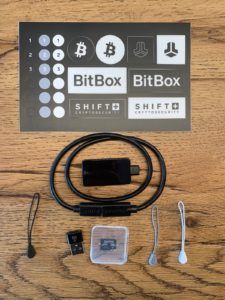
Package Contents
- BitBox02 hardware wallet
- microSD memory card
- USB-C extension cable
- USB-C to USB-A adapter
- Rubber bands for storage
- Stickers for labeling
In addition to the actual device, the package includes other accessories, including the microSD memory card for backup, a USB-C extension cable, and a USB-C to USB-A adapter.
Guide: Setting Up the BitBox02 Hardware Wallet
- First, visit the manufacturer’s website at shiftcrypto.ch/start and download the BitBoxApp. Versions are available for Windows, macOS, and Linux.
- Now insert the microSD card into the designated slot and connect the BitBox02 to your computer.
- As soon as the BitBox02 is plugged in, the setup wizard starts automatically and guides you step by step through the setup process. First, select the screen orientation and then confirm that the code on the BitBoxApp and the BitBox02 is identical.
- Now you can either create a new wallet or restore an existing wallet. Next, set a device name and a device password.
- Both passwords should be written down and stored separately from each other, securely, and above all offline.
- Now remove the microSD card from the BitBox02 and also store it in a safe place.
Warning: The microSD card is not password-protected. Anyone with access to the card can also access the cryptocurrencies stored in the wallet.
It cannot be emphasized enough how important protecting the microSD card and the recovery seed is.
Anyone who wants to be extra safe and additionally protect the seed from water, fire, and the ravages of time can secure it in titanium, as with CryptoTag.
BitBox02 Multi Edition vs. BitBox Bitcoin Only Edition
The BitBox02 comes in two different versions: as BitBox02 Multi Edition and as BitBox Bitcoin only Edition.
The names are largely self-explanatory: the Bitcoin only version supports exclusively Bitcoin.
The Multi Edition is additionally suitable for Litecoin, Ethereum, and ERC20 tokens.
For comparison: competing wallets like Ledger Nano X additionally support numerous other altcoins.
So anyone who also wants to trade cryptocurrencies beyond BTC, LTC, ETH, or ERC20 tokens should consider this when choosing the right hardware wallet.
Pros and Cons of the BitBox02
| Advantages | Disadvantages |
|---|---|
| Automatic backup via microSD card | Fewer supported coins than Ledger |
| Very simple setup | No Bluetooth function |
| High-quality design | microSD card not password-protected |
| Touch sensors for easy operation | |
| Bitcoin only variant available |
Conclusion: What the Hardware Wallet Made in Switzerland Can Do
After our test, we like the BitBox02 hardware wallet exceptionally well.
The design is appealing but not too revealing. Setup takes barely five minutes and operation via tapping, swiping, or holding the touch sensors works intuitively.
The dual backup option via microSD card and recovery seed also reduces the risk of permanently losing access to the wallet.
Interesting bonus: The BitBox02 is also FIDO U2F compatible and can therefore also be used for two-factor authentication for accounts at Google, Facebook, or Dropbox.
At currently around CHF 109.00, the wallet is also somewhat cheaper than some competing products.
So anyone looking for a hardware wallet and not planning to trade exotic altcoins is well advised with the BitBox02 hardware wallet.
However, it’s important to buy hardware wallets exclusively directly from the manufacturer or from official distribution partners like bitConsult for Switzerland.
Other Hardware Wallets: